In an increasingly digital and connected world, smartphones play a key role in our lives. Certainly, one of the most used features on these devices is the sound system, whether for listening to music, watching videos or making calls. However, sometimes the cell phone volume may not be enough to satisfy our needs.
Fortunately, there are apps that can increase the volume on your smartphone, giving you an even better listening experience. In this article, we'll explore the best apps to make your phone's volume louder, making your listening experience more satisfying and intense.
The best apps to make your phone volume louder
Volume Booster GOODEV
The first app on our list is GOODEV Volume Booster, a simple and efficient app that promises to boost your smartphone's volume by up to 20%. In addition, the application has a minimalist and easy-to-use design.
Just open the app and adjust the slider to set your desired volume level. However, it is worth remembering that excessive use of this application can damage the speakers of the cell phone, so use it in moderation.
Equalizer & Bass Booster
Another app worth mentioning is Equalizer & Bass Booster. This app not only increases the volume of your smartphone, it also allows you to customize the sound according to your preferences. Thanks to its various equalization and bass boost options, you can optimize your device's sound for the best possible listening experience.
Precise Volume
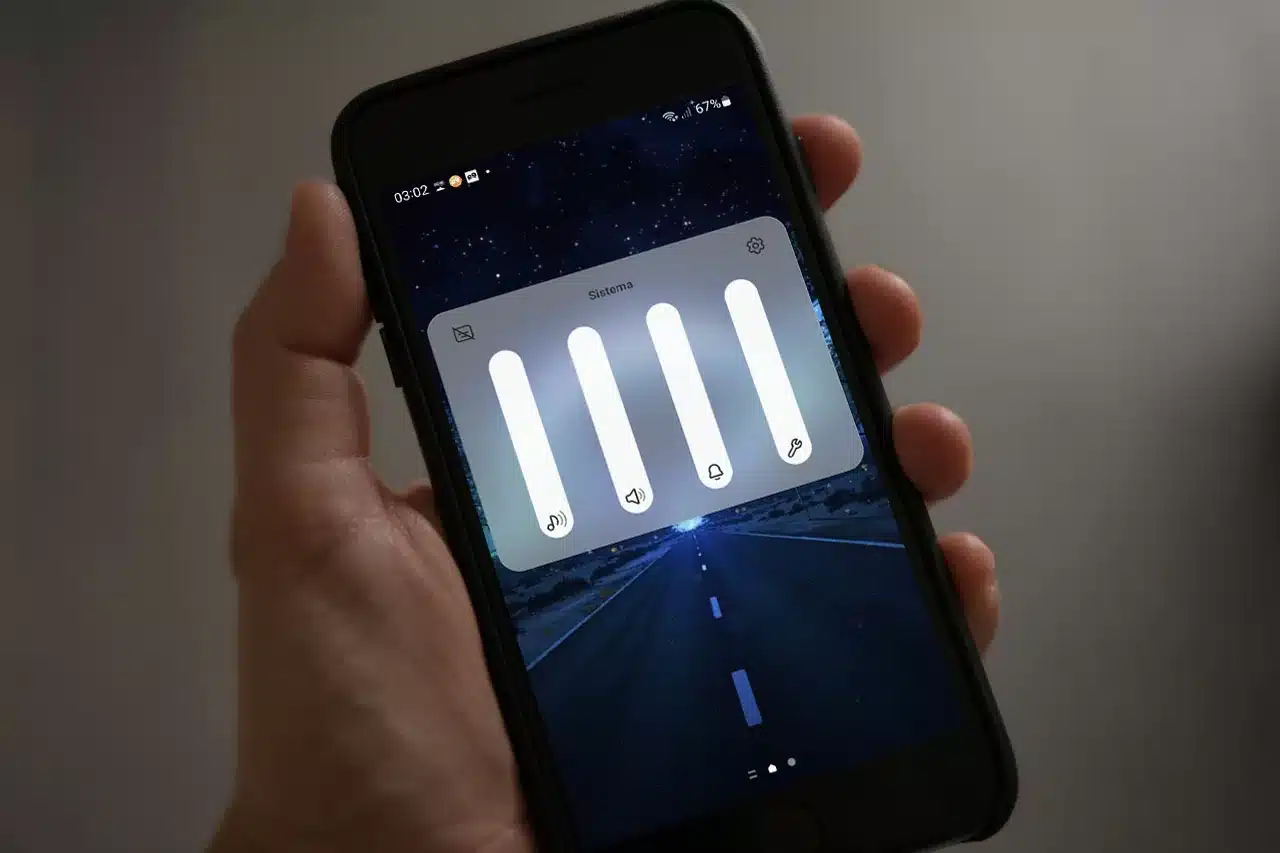
Precise Volume is an app that gives you full control over your phone's volume. This application allows you to adjust the volume of each cell phone function, such as calls, alarms and multimedia, independently and precisely.
Furthermore, Precise Volume also has a built-in equalizer to further enhance the sound of your device.
VLC for Android
Although VLC for Android is best known as a media player, it also has features that allow you to increase the volume on your smartphone. Supporting a wide range of audio and video formats, the application allows you to increase the volume up to 200%. However, as with other volume booster apps, it's important to be careful not to damage your phone's speakers.
Speaker Booster
Finally, we have Speaker Booster, an application that promises to improve your smartphone's volume in all areas, from music to phone calls. The app is simple to use and offers a slider to easily adjust the volume on your device. However, it is essential to exercise caution when using the application to avoid damage to the cell phone's speakers.
Conclusion
In conclusion, the apps mentioned above are great options for those who want to increase the volume of their cell phone and have a more satisfying sound experience. However, it is important to remember that excessive use of these apps can cause damage to your device's speakers. Therefore, use them in moderation and make the most of your smartphone's sound.
How to choose between the options
- Billing model. Check if it's free with ads, a one-time payment, or a subscription. Subscriptions for simple tasks rarely make sense.
- Does the system already do that?. Android and iOS both come with built-in flashlight, recorder, document scanner, meter, and QR code reader. It's worth checking before installing yet another app.
- Permissions that the application requests. It's the quickest test of reliability. A flashlight app that asks for contacts and location doesn't need that to work.
- Size and memory usage. Utility applications should be lightweight. Those that exceed a few hundred megabytes often contain advertisements and trackers.
What these apps don't do
This is the part that almost no list mentions, and it's precisely what separates expectation from result.
- No app actually increases battery capacity — what you can do is reduce consumption by turning off features.
- Cleaning apps don't permanently speed up your device: Android already manages memory on its own.
- They are not a substitute for professional equipment. Cell phone sensors are for estimation, not for technically precise measurements.
- Apps that promise impossible functions are often advertising platforms, and some request permissions they shouldn't.
Frequently Asked Questions
Does a cleaning app improve performance?
A little and for a short time. The real gain comes from uninstalling what you don't use and freeing up storage space.
Does it work without internet?
Those that process locally, yes. Those that rely on a server require a connection and send their data externally.
Do I have to pay to use it?
In most utilities, no. The free version with ads works fine, and the paid version is for removing ads.
Are these apps safe?
Check the permissions and the number of reviews. Any utility that requests access to contacts, messages, or accessibility without a clear reason should be avoided.
How do I know if an app is trustworthy?
Look at the developer, number of reviews, date of last update, and permissions requested. Those four together say a lot.
How to use it in practice
- Check if it works offline. If the task is local but still requires a connection, your data is being sent to a server.
- Adjust the notifications on the first day. Leaving everything plugged in is the most common reason for uninstallation in the first week.
- Try the free version before you pay. Check if the feature you want is outside the free plan—it usually is.
- Check what the app asks for during installation. Compare the permissions with what it actually does. It's the quickest test of trustworthiness.
What goes wrong most often?
- Choosing based on average rating without reading recent negative reviews.
- Granting access to contacts, messages, or accessibility without a clear reason.
- Believing in a feature that the device's hardware does not support.
- Ignore the fact that the free version limits exports or applies a watermark.
What the cell phone itself already does.
It's worth opening the search in your phone's settings before installing: Android and iPhone already have several built-in functions, and the native app usually consumes less battery and doesn't ask for any permissions beyond what's necessary.
The cell phone speaker has a physical ceiling.
A cell phone produces sound with a tiny transducer, about the size of a fingernail, powered by a very low-power amplifier. This combination defines a limit that no software can surpass.
High volume requires moving air, and moving air requires the speaker diaphragm to travel a greater distance. In such a small component, this distance is quickly exhausted. When the diaphragm reaches the end of its travel, it won't go any further, no matter how much the signal demands.
The amplifier has a similar limit. It operates with the voltage available from the battery, and the signal cannot exceed that voltage. The limit is set by the circuit, not the application.
Bass frequencies suffer first. Reproducing low frequencies requires displacing a lot of air, something a speaker of that size can't do. That's why music on a cell phone sounds thin even when it's loud.
A device with two speakers has a real advantage, but it's in sound width and balance, not double the power.
What happens when the software goes beyond that limit?
A volume booster app basically does one thing: it multiplies the audio signal by a number greater than one. While there's some headroom, the sound actually gets louder.
When the multiplied signal exceeds what the system can handle, the wave peaks have nowhere to go and are clipped. The rounded top of the wave becomes a flat plateau. That's clipping.
When listening, clipping appears as hissing, roughness in the voice, a metallic sound in the high frequencies, and a feeling that the bass has disappeared. The meter registers a higher volume, but the ear perceives lower quality.
There is a physical side effect. A clipped signal carries constant energy instead of oscillation, which heats the speaker coil. Prolonged use at full volume, with reinforcement on top, shortens the life of the component and can leave a permanent hiss.
A word of caution regarding device security: apps that promise to multiply the volume several times are promising something the hardware doesn't deliver, and this promise is often accompanied by aggressive advertising and permission requests unrelated to audio.
What increases the perceived volume without ruining the sound?
Perceived volume is not the same thing as power. You can achieve clarity without going near the cutoff.
The most efficient approach is equalization. The human voice and most of the information in a dialogue fall within the mid-range of the spectrum, and it is precisely this range that the ear perceives most sensitively. Enhancing the mid-range frequencies and slightly reducing the bass, which the speaker doesn't reproduce anyway, makes the audio noticeably more understandable without increasing the overall volume.
Raising all the frequencies at the same time has the opposite effect: it consumes headroom and brings on distortion prematurely.
The second tool is normalization, also called volume equalization. It brings the level of different tracks and videos closer together, solving the most common everyday problem, which is when a video is recorded too quietly, forcing you to turn everything up and then getting a shock in the next video.
Noise reduction in the player helps in the case of recordings with background hiss, because what hinders comprehension is not always the lack of volume.
Position, dust, and cover change more than any app.
The sound from a cell phone is very directional, and the speaker is located at the base or on the sides. Where it's pointed changes everything.
The cupped hand behind the speaker works because it reflects the wave forward, which would otherwise go backward and to the sides. The gain is immediate and costs nothing. Placing the device inside a glass, mug, or bowl uses the same principle, with the shape of the container concentrating the sound in one direction.
Hard surfaces, like tables and tiles, reflect and help. Soft surfaces, like sofas, mattresses, pillows, and pockets, absorb and reduce volume. A cell phone lying with the speaker against the pillow loses a good portion of the sound before it reaches you.
Two causes of loss go unnoticed for months:
- Dust and lint accumulate in the speaker grille, progressively muffling the sound. A dry toothbrush or soft paintbrush will solve the problem. Avoid using sharp objects or high-pressure compressed air.
- The case and screen protector are poorly fitted, partially covering the port. Simply remove the case and compare to see the difference.
When the volume really needs to be higher, the solution is different hardware. A simple Bluetooth speaker has a larger speaker, a real acoustic enclosure, and its own powerful amplifier. It solves the problem instead of just masking the symptom.
The limit isn't set by the device, it's set by your ear.
There is a ceiling before the speaker, and it is biological.
The widely adopted and recommended reference by the World Health Organization works with exposure, not isolated volume: approximately 85 decibels for up to 8 hours is the parameter used as a basis. As the level rises, the safe time drops rapidly, and a few steps above that, the calculation becomes minutes, not hours.
Android displays a warning when the headphone volume exceeds a safe level and allows you to set a maximum limit in the sound settings. This warning isn't just a formality: it exists because excessive headphone volume is the most common cause of damage.
The point that many people ignore is the accumulation. Noise-induced hearing loss is cumulative and permanent. The cells responsible for hearing do not regenerate, and the ringing in the ears that appears after a very loud sound is a sign of damage, not temporary fatigue.
A rule of thumb that doesn't require a measuring device: if you can't hear someone speaking at a normal volume from a meter away, it's too loud. Another reference point is leakage—if someone next to you can hear what's playing in your headphones, the level has already exceeded what's reasonable.
In noisy environments, headphones with good isolation or noise cancellation offer more protection than any volume boost, because they allow you to hear well at a lower volume.