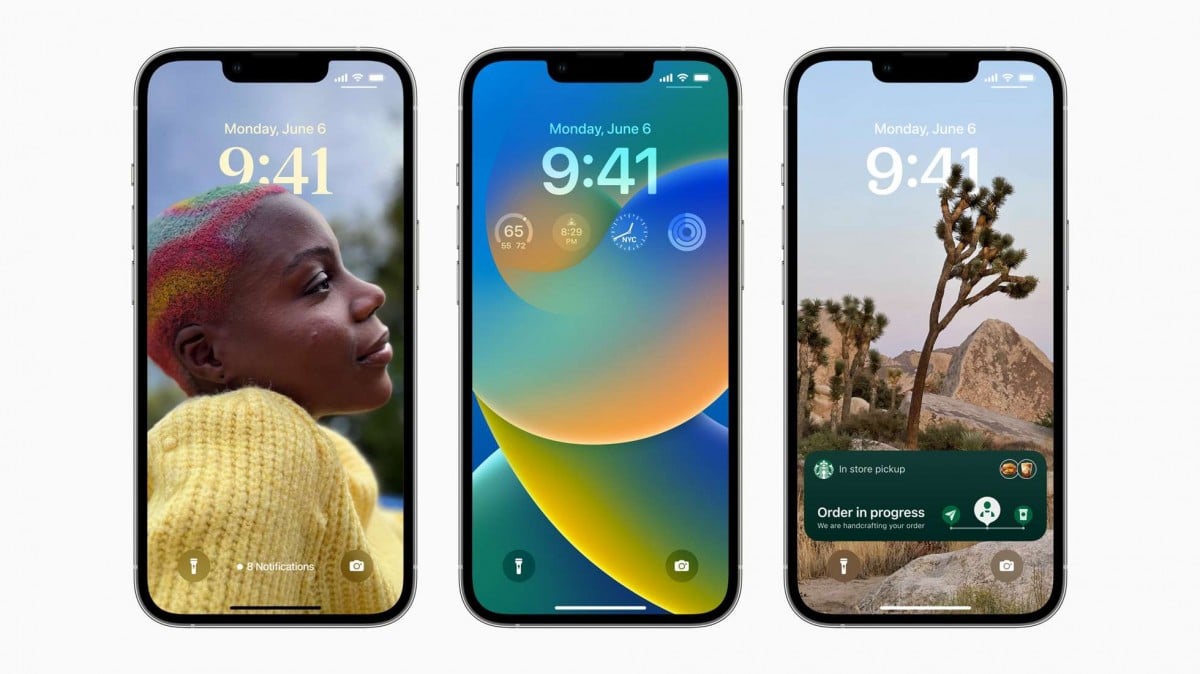
The lock screen is the first thing you see when you pick up your phone. Why not make it more beautiful and personalized using customization apps?
With a wide variety of options available, you can find the right app for your needs. From animated wallpaper apps to tools that display clocks, dates, and useful information on the screen — there's something for everyone.
In this article, you'll learn about the 5 best apps to customize your phone's lock screen. A word of warning beforehand: on Android, the system lock screen is limited, and most apps either use the wallpaper (which appears on both screens) or install their own lock screen over the original one.
In addition, you will see the main features of each application, which helps you choose the right solution for your needs.
Meet the 5 best apps to transform your lock screen
The lock screen is one of the first things you see when using your phone, so it's worth making it attractive and personalized.
With that in mind, we've selected 5 apps that are available in official app stores and deliver on their promises.
KLCK Custom Lock Screen Maker
This one is the most straightforward: KLCK creates an entire lock screen from scratch, with the elements you want — clock, weather, battery, shortcuts, notifications, and background images.
It requires a bit of patience at first, because everything is set up as if it were an editor. On the other hand, it's the only one on the list that truly replaces the Android lock screen. Free, with a paid version to unlock advanced features. Available for... android.
Zedge
Zedge is a classic personalization app. It brings together a huge catalog of wallpapers, ringtones, and notification sounds, and allows you to apply your chosen image to the lock screen, home screen, or both.
It's easy to use, has category search, and works well on any device. Free, with ads and an optional subscription. Available for android It is iphone.
KLWP Live Wallpaper Maker
KLWP is the sibling of KLCK and is for those who want to go beyond ready-made wallpaper.
With it, you can create animated and interactive wallpapers, with a clock, system information, and elements that react to touch. Since the wallpaper also appears behind the lock screen, the effect is consistent across both screens.
It has color adjustment, effects, and a large community sharing ready-made templates. Free, with a paid Pro version. Available for android.
Check also:
- Apps that simulate what your baby's face will look like.
- Apps to create avatar with your photos
- Apps to make free virtual invites
muzei live wallpaper
Muzei is the lightest and most discreet option. It automatically changes the wallpaper at intervals you define, using famous works of art or photos from your own gallery.
The charm lies in the soft blur effect, which keeps the icons legible without obscuring the image. Since it's a wallpaper, the design also appears behind the lock screen. It's free and open-source, with no ads. Available for... android.
walli
Walli is the simple choice for those who just want a beautiful image. It brings together high-resolution wallpapers created by artists from all over the world, organized by category, and when applying them you choose whether you want them on your home screen, lock screen, or both.
It's free, with ads and an optional subscription for unlimited downloads. Available for android.
If your goal is simply to change the image without complications, Walli and Zedge can handle that in a snap. If you want to create something custom, with a clock and information exactly how you like it, then it's worth investing time in KLCK.
Conclusion
Customizing your lock screen is an inexpensive way to personalize your phone and make it more enjoyable to use.
With the variety of apps available, you can find the right option for your taste and your level of patience with settings.
It's worth remembering that some manufacturers, such as Samsung and Xiaomi, already include their own lock screen tools in the device settings — it's worth checking before installing anything. From simple ones like Walli to advanced ones like KLCK, there's a solution for every need. Experiment and transform the way you interact with your phone.
Criteria that make a difference in the choice
- Permissions that the application requests. It's the quickest test of reliability. A flashlight app that asks for contacts and location doesn't need that to work.
- Does the system already do that?. Android and iOS both come with built-in flashlight, recorder, document scanner, meter, and QR code reader. It's worth checking before installing yet another app.
- Billing model. Check if it's free with ads, a one-time payment, or a subscription. Subscriptions for simple tasks rarely make sense.
- Update frequency. An app that hasn't been updated in over a year is likely to break with the next system version.
What these apps don't do
It's important to know what's beyond the reach of this category—that's what avoids frustration and, most importantly, prevents falling for those who promise the impossible.
- Apps that promise impossible functions are often advertising platforms, and some request permissions they shouldn't.
- Cleaning apps don't permanently speed up your device: Android already manages memory on its own.
- Features that rely on missing hardware won't work via software. Without the sensor, no application can solve the problem.
- They are not a substitute for professional equipment. Cell phone sensors are for estimation, not for technically precise measurements.
Frequently Asked Questions
How do I know if an app is trustworthy?
Look at the developer, number of reviews, date of last update, and permissions requested. Those four together say a lot.
Do I have to pay to use it?
In most utilities, no. The free version with ads works fine, and the paid version is for removing ads.
Does a cleaning app improve performance?
A little and for a short time. The real gain comes from uninstalling what you don't use and freeing up storage space.
Doesn't the cell phone already do that automatically?
It often does. Flashlight, recorder, document scanning, ruler, and QR code reader are native features in recent versions.
Are these apps safe?
Check the permissions and the number of reviews. Any utility that requests access to contacts, messages, or accessibility without a clear reason should be avoided.
What to do, in order.
- See what takes up space before installing a cleaner. In Settings › Storage, the system itself shows the breakdown by type. Almost always the culprits are video and social media cache.
- Uninstall anything that hasn't opened in months. The list by usage time is in the settings. It's the most lasting way to save space.
- Restart before concluding that it's slow. Much of the slowness disappears with a restart, without needing any application.
- Clear the cache of larger applications. You can do it app by app in the settings, without installing anything, and without losing your login or settings.
Where most people slip
- Trusting an app that promises functionality without having the corresponding sensor on the device.
- Installing a cleaner that promises to speed up your phone — Android already manages memory on its own, and the gains don't last.
- Deleting an application folder through the file manager can result in lost data that cannot be recovered.
- Install three utilities that do the same thing, all running in the background.
The alternative that is already included in the system
Android and iPhone already include features like a flashlight, voice recorder, document scanning, QR code reader, ruler, compass, level, and screen recording. Before installing, it's worth checking the settings – many people install what they already have.