Music is an important part of many people's lives, providing a backdrop to our most memorable moments, helping us relax and even boosting our productivity. With the proliferation of smartphones, listening to music has become even more accessible.
However, streaming music online can consume a significant amount of data, which is a problem for those with limited data plans. Fortunately, there are applications that allow you to listen to music offline, that is, without wasting your internet.
This article will introduce the top five music apps of 2023 that allow this function.
The best music apps of 2023
Spotify
First up, we have Spotify, one of the most popular music apps in the world. Spotify Premium allows users to download songs, albums, and playlists for offline listening. With a vast catalog of tracks from every imaginable genre, Spotify is an excellent choice for any music lover.
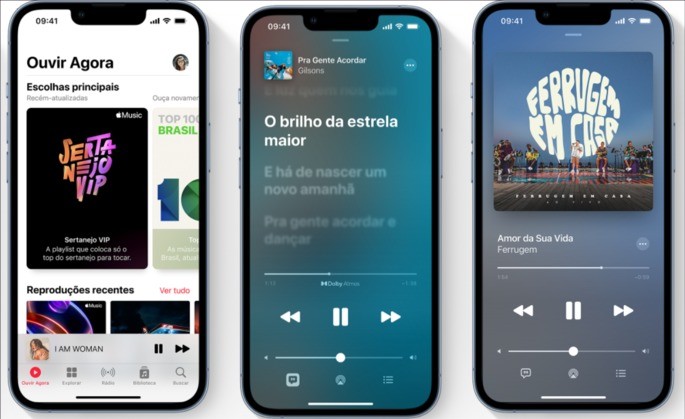
Apple Music
Second, we have Apple Music. Similar to Spotify, Apple Music also allows its subscribers to download music for offline listening. Also, Apple Music is known to have some unique albums and offers seamless integration with other Apple devices.
deezer
Then Deezer is another popular music service that offers download option for offline listening. Deezer has a clean and intuitive user interface, and also provides personalized song suggestions and playlists based on each user's preferences.
YouTubeMusic
Later, YouTube Music is a music streaming service that also allows users to download music for offline listening with a Premium subscription. YouTube Music stands out for its integration with YouTube's vast catalog of music videos, giving users the option to switch between audio and video.
Tidal
Finally, we have Tidal, a music service that stands out for offering high fidelity audio. Like the other services mentioned, Tidal allows its users to download music for offline listening. Also, Tidal is known for offering exclusive content from popular artists.
Conclusion
In conclusion, in 2023, there are many excellent music apps that allow users to listen to music without spending internet data. Whatever music genre you prefer, there is an app that will suit your needs.
By opting for a premium subscription on any of these services, you can enjoy your favorite tracks, albums and playlists anytime, anywhere without worrying about data consumption. So no matter where you are, the music you love is always within reach.
Before deciding, check these points.
- It works on your device. Watches, cars, and speakers don't always have the app. It's worth checking beforehand if the service integrates with what you use.
- Family or individual plan. Family plans typically start with two people and require a shared address for most services.
- Data usage. Streaming in high quality consumes a lot of data. Adjusting the quality on your phone will prevent surprises when it reaches your data limit.
- Audio quality available. The bit rate varies by plan. On standard headphones the difference is subtle; on better equipment, it's noticeable.
What these apps don't do
Every category has a limit, and knowing this one's limit saves time and money by avoiding those who promise more than what's available.
- Lyrics and credits depend on what the record label sent and are sometimes incomplete.
- Losing your subscription means losing access to what you downloaded — it's not a purchase, it's a usage license.
- An app that offers paid content for free is piracy and often comes with intrusive advertising or malware.
- Tracks are removed from the catalog when the license expires, including tracks from pre-made playlists.
Frequently Asked Questions
Can I use it in the car?
Yes, via Bluetooth, or through Android Auto and CarPlay in compatible vehicles.
Can I listen for free?
It's possible, with advertising and some limitations, such as random order and a restricted number of jumps.
Can I listen without internet?
Only by downloading it within the app, which generally requires an active subscription.
How much data does streaming use?
At high quality, it's around 100 to 150 MB per hour. Reducing the quality in the settings significantly lowers this number.
Can I transfer my playlists?
There are services that migrate playlists between platforms. The transfer usually works well, with occasional losses of unavailable tracks.
How to truly take advantage of it.
- Set up the equalizer once. Adjust according to the headphones you use — it's the cheapest way to improve sound quality.
- Let the app learn. Liking and skipping are key to the recommendation. Two weeks of use significantly changes what appears.
- Download playlists via Wi-Fi. Get it ready before you leave. The download is within the app and depends on an active subscription.
- Migrate your playlists when switching services. There are tools for transferring data between platforms; the loss is usually only due to unavailable tracks.
Common mistakes that are costly
- Installing an app that offers a paid catalog for free is piracy and usually comes with intrusive advertising.
- Cancel your subscription and lose access to all downloaded data.
- Signing up for the family plan without checking the requirement for a shared address.
- Listen in high quality using mobile data and exceed your data allowance.
Before installing: what's already on the device
YouTube functions as a huge free catalog for discovering music, and streaming radio continues to exist within various free apps. For offline listening without a subscription, your own files can still play on the system's native player.
The account that tells you how much audio consumes.
Music streaming consumes data based on one main variable: the audio bitrate, measured in kbps, kilobits per second. Knowing the bitrate, the hourly consumption becomes a simple calculation.
Divide the number of kbps by 8 and you have how many kilobytes per second pass through the network. Multiply by 3,600 and you arrive at the consumption of one hour of continuous listening.
Applying the calculation to the most common rates, the picture looks like this:
- Near 96 kbps12 KB per second, or something around that. 43 MB per hour.
- Near 160 kbps20 KB per second, or something around that. 72 MB per hour.
- Near 320 kbps40 KB per second, or something around that. 144 MB per hour.
These are orders of magnitude. Network headers and album covers add up slightly, but the error is small.
How much does a 2 GB package yield?
A 2 GB data package is equivalent to 2,048 MB. Dividing by the rates above, you can see how much music time fits within it, assuming nothing else uses up the data allowance.
- At the lowest quality, something around 47 hours Hearing aids for the month.
- At the intermediate quality level, something around 28 hours.
- At maximum quality, something around 14 hours.
Fourteen hours in thirty days means less than half an hour a day. Those who listen to music on their commute to and from work exceed that amount in the first week.
The practical conclusion is straightforward: maximum quality triples the cost compared to minimum quality, and the sound difference between them, in regular headphones on a bus, is much smaller than the difference in data usage.
The music video takes the concept to another level.
Listening to a music video on a video app is not the same as listening to the live track. It also involves video, and video costs significantly more bits than sound.
The difference isn't a few percent: it's several times. One hour of high-definition video can consume more energy than an entire day of medium-quality music. If the goal is just audio, using a video app as a radio is the most expensive way to do it.
Many video apps have resolution adjustment during playback or in the settings. Lowering the resolution cuts consumption even when you're not looking at the screen.
Where to change the app settings
Most streaming players offer specific consumption controls. The names change, but the features to look for are always the same.
- Separate quality for mobile data and Wi-Fi.. This is the most cost-effective setting. Leave the high quality setting only on Wi-Fi and the low quality setting on the SIM card.
- Download quality. This is a distinct playback setting. Downloading at maximum quality unnecessarily fills up the device's memory.
- Automatic video playback. Some apps start playing video clips when you scroll. Turning them off reduces invisible data usage.
- Download only via Wi-Fi.. It prevents an unexpected synchronization from happening in the middle of the street.
- Download before leaving. Leaving the download routine running at home is the difference between spending nothing and using up your entire data allowance on the way.
Android's own data controls
Regardless of the application, the system has its own brakes. They work even when the app is not cooperating.
In the network settings there is the warning and data usage limit. The alert sends a notification when the defined value is reached; the limit cuts off the mobile data connection when the limit is reached. It's important to align the cycle with your plan's renewal date, otherwise the count will be incorrect.
There is also data economy, which restricts background traffic in general and reduces the consumption of applications that are constantly syncing on their own.
And there is restriction by applicationWithin each app's data usage screen, you can block background usage or mobile data usage entirely, keeping only Wi-Fi enabled.
Two alternatives completely avoid the data bill. A built-in FM radio, The technology, present in some devices, picks up a signal wirelessly using the headphone cable as an antenna and doesn't use up any data allowance. And music files stored in memory, played by a local player application, also don't use the network.
Details that add up without anyone noticing.
Some nice features pull traffic outside the track that's playing. Individually they're small; together, and over the course of the month, they show up on the statement.
- Synchronized lyricsIt downloads a file for each song, in addition to maintaining communication with the server.
- High-resolution coversImages loaded when browsing lists and albums.
- Video podcastIt's video, with the cost of video, even with the screen off in some cases.
It's also worth knowing that offline mode doesn't mean absolutely zero data consumption. The app exchanges a small amount of data from time to time to validate authorization for downloaded content and synchronize listening history. It's minimal traffic, in the range of a few KB, but it explains why the app still appears in the data usage list even when you're only listening to what was already saved.