
Often when using our smartphone, we notice a certain slowness when performing certain tasks. This often happens because your cell phone is overloaded, either with too many photos in the gallery or temporary files that consume your device's memory. And for that, perhaps the best option is to download apps to clean your cell phone.
But how do I know exactly what is consuming my phone's memory? Well, for that there are some applications that identify what is causing this slowdown and with a few clicks you will have your cell phone free again.
3 best mobile cleaning apps
There are many apps that offer this service, but we've made a list of the 3 best apps that will help you a lot in the daily use of your smartphone.
Clean your cell phone with Norton Cleaner.
As we mentioned earlier, it can be very difficult to find what's causing your phone to slow down, because sometimes you delete some files but some fragments always remain. The Norton Cleaner app is an excellent option for cleaning your phone. After installing the app, it will free up your device's memory with just a few clicks.
The app is very intuitive and easy to use. All you need to do is authorize the app to perform the cleaning process. In addition, the Norton Cleaner It's a lightweight app, which helps to avoid further overloading your device.
Key features of Norton Cleaner:
- Clear your phone's cache.
- Remove application residual package files.
- Improve memory space.
- List the apps you rarely use so you can uninstall them (system-installed apps cannot be removed this way).
The app is available for Android and IOS.
Clean Phone with CCleaner
Another option to clean your cell phone is the Ccleaner. Launched in 2004, the software was and still is widely used for slow computers, freeing up memory and removing residue left by the browser or programs.
With the rapid growth of smartphones, the ccleaner it was also made available for cell phones and brings the same functions it had for computer.
The app has features such as: Uninstall unwanted or unused applications, smartphone scanning to free up storage space. Remove trash left by uninstalled apps, between others.
The app is available for android It is iOS and it's free.
Clean Phone with Google Files
Very popular on smartphones, the Google Files is an excellent file management app that helps you free up space on your phone by using recommended cleansers.
To do this, the user just needs to install the application and follow the directions indicated on the screen. With a few clicks, you can scan the entire device for cleaning.
The app has features to remove duplicate photos, compress very large files, and uninstall apps that you are no longer using. Furthermore, with the Google Files it is also possible:
- Offline file sharing.
- Find and open your files more easily.
- Give suggestions to free up space on your phone.
- back up to cloud.
Conclusion
Often your device stops working due to lack of simple optimization like those recommended in this article. Generally, what slows down the most are the photos in your gallery. Whether taken by yourself, or the ones you receive via WhatsApp. Thinking about it, the best option is to use cloud storage, which is a great option to free up space on your device, in addition to not losing your photos or files if you lose your smartphone.
Before deciding, check these points.
- Does the system already do that?. Android and iOS both come with built-in flashlight, recorder, document scanner, meter, and QR code reader. It's worth checking before installing yet another app.
- Billing model. Check if it's free with ads, a one-time payment, or a subscription. Subscriptions for simple tasks rarely make sense.
- Update frequency. An app that hasn't been updated in over a year is likely to break with the next system version.
- It works offline. Many of these utilities don't require internet access. If an app requires a connection for a local task, you should be suspicious.
What these apps don't do
Every category has a limit, and knowing this one's limit saves time and money by avoiding those who promise more than what's available.
- Cleaning apps don't permanently speed up your device: Android already manages memory on its own.
- Apps that promise impossible functions are often advertising platforms, and some request permissions they shouldn't.
- No app actually increases battery capacity — what you can do is reduce consumption by turning off features.
- They are not a substitute for professional equipment. Cell phone sensors are for estimation, not for technically precise measurements.
Frequently Asked Questions
Are these apps safe?
Check the permissions and the number of reviews. Any utility that requests access to contacts, messages, or accessibility without a clear reason should be avoided.
Do I have to pay to use it?
In most utilities, no. The free version with ads works fine, and the paid version is for removing ads.
Does it work without internet?
Those that process locally, yes. Those that rely on a server require a connection and send their data externally.
Does a cleaning app improve performance?
A little and for a short time. The real gain comes from uninstalling what you don't use and freeing up storage space.
Does it consume a lot of battery?
It depends on what's running in the background. Check the usage per app in the settings and restrict anything that's excessive.
How to truly take advantage of it.
- Uninstall anything that hasn't opened in months. The list by usage time is in the settings. It's the most lasting way to save space.
- See what takes up space before installing a cleaner. In Settings › Storage, the system itself shows the breakdown by type. Almost always the culprits are video and social media cache.
- Move photos and videos to the cloud. After confirming the backup, release the local copy. It usually returns several gigabytes.
- Clear the cache of larger applications. You can do it app by app in the settings, without installing anything, and without losing your login or settings.
Common mistakes that are costly
- Installing a cleaner that promises to speed up your phone — Android already manages memory on its own, and the gains don't last.
- Trusting an app that promises functionality without having the corresponding sensor on the device.
- Granting accessibility permission to a utility that doesn't need it.
- Install three utilities that do the same thing, all running in the background.
Before installing: what's already on the device
Android and iPhone already include features like a flashlight, voice recorder, document scanning, QR code reader, ruler, compass, level, and screen recording. Before installing, it's worth checking the settings – many people install what they already have.
A full memory is two different things.
The word "memory" covers two components that don't mix, and confusing the two is why so many people install the wrong application.
O storage This is where photos, videos, music, and installed apps are stored. It's the number that appears in the device's advertising: 64 GB, 128 GB, 256 GB. It fills up and doesn't empty on its own.
A RAM memory This is the temporary workspace. Everything that's open now uses RAM, and it's cleared when the device shuts down. The options are 4 GB, 6 GB, 8 GB — much smaller numbers.
When the warning says "storage almost full," the problem is the first one. When the phone freezes while switching apps, it's usually the second one. Cleaning apps sell both as if they were the same, and that's where the promise doesn't hold up.
Why "freeing up RAM" doesn't speed things up at all.
Android was designed to use all available RAM. Keeping an already loaded application in memory is what allows you to return to it instantly. Idle RAM doesn't speed up the device—it's simply not being utilized.
That's why the number shown by an "accelerator" is misleading. It closes processes, displays a large amount of megabytes freed, and the system reloads a good portion of them in the following seconds because they are still needed. The result is negative: it wastes processing power and battery to redo what was already done.
The management already exists and is automatic. When RAM runs out, the system automatically terminates the oldest applications, following a priority order. No ordinary application has permission to do this better.
Two side effects of forcing mass lockdowns:
- Notification delayed or lost. Messages, alarms, and reminders depend on background processes. If forcibly terminated, they arrive late or not at all.
- Slower opening. Every closed application needs to reload everything the next time.
Closing apps one by one from the recent apps screen, out of habit, has the same problem. It makes sense for an app that has crashed. As a daily routine, it doesn't.
What really slows down a cell phone?
Slow performance is almost never caused by occupied RAM. The most common causes are others:
- Storage at its limit. Flash memory loses performance when there is little free space left, because the system needs to rearrange blocks to store anything. Keeping 10% to 15% free resolves a large part of the problem.
- Heating. When the device overheats, the processor slows down to protect itself. Charging and playing games at the same time, or using it in direct sunlight, causes this. A thick case makes it worse.
- Degraded battery. After a few years, the battery no longer delivers peak current, and the system limits performance to prevent it from shutting down on its own. Replacing the battery usually restores the feeling of having a brand new device.
- Apps that keep waking you up. Some services sync all the time. The battery menu shows which devices have consumed the most power in the last few hours—and that's where the culprits appear.
- System updates. Newer versions demand more from the device. This is noticeable in older models.
- System animations. Reducing the animation scale in the developer options doesn't make the device faster, but it does make each transition finish sooner, and the response seems immediate.
The cleaning app paradox
An installed cleaner needs to run to monitor. Monitoring means being constantly loaded, checking files, and displaying notifications. In other words, an application that promises to free up resources ends up consuming them permanently.
Here are some things to consider before keeping one of them on your device:
- Does he request accessibility permission? This permission grants access to the screen's content and is the most powerful in the system. A screen cleaner doesn't need it.
- Does it show full-screen ads? Many in this category make a living from advertising, and the "critical memory" alert exists to trigger the cue that opens the advertisement.
- Does it create a permanent notification? Fixed notifications keep the process alive at all times.
- Does it promise to "optimize the battery"? There's no magic optimization. The system has had Doze and background limitations since Android 6.
A file manager, used when you want, without a permanent service, delivers what matters without that cost.
A routine that works without installing anything.
- Restart the device once a week. It's the only true "RAM cleaning" method, and it also resolves accumulated freezes.
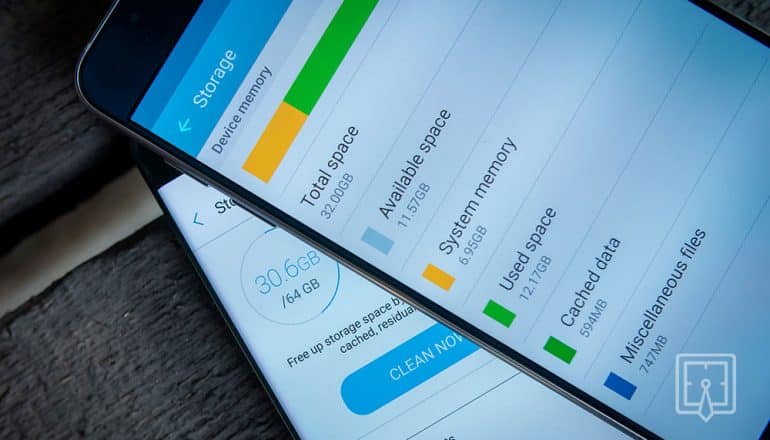
- Open the system storage menu. And see the breakdown by category. The system shows exactly who occupies what position.
- Clear the cache of the specific application. Clearing the cache is safe; clearing data erases login and settings.
- Uninstall anything that hasn't opened in months. Each installed app takes up space and may wake up in the background.
- Disable instead of uninstalling. These are factory-installed applications that cannot be removed. When disabled, they will stop running and updating.
- Keep the system updated. Performance and security fixes are coming soon.
- Check the battery health. If the device is more than two years old and the slowdown appeared along with a decrease in battery life.
If the device remains slow even with ample storage after that, the problem is likely a hardware issue. In that case, no app will solve the problem—and persisting will only add another process running.



