Personal finance is an important part of everyone's life. To help them manage their finances efficiently and easily, there are many personal finance apps available for mobile devices.
In this article, we'll discuss what personal finance apps are, how they work, and introduce you to some of the best apps out there.
What are Personal Finance Apps
Personal finance apps are software programs designed to help people manage their personal finances efficiently and conveniently.
They allow users to monitor their income and expenses, track their investments and track their spending.
how they work
Most personal finance apps work like this: Users download the app on their mobile device and create an account.
Then they add information about their income, expenses and investments.
Apps analyze information provided by users and generate reports and graphs that show how they are spending their money.
Some apps also offer recommendations on how users can save money and improve their financial situation.
Best Personal Finance Apps
Below are some of the best personal finance apps available on the market.
mint
Mint is one of the most popular personal finance apps available. It allows users to track their income, expenses and investments in one place.
Mint also provides recommendations on how users can save money and improve their financial situation.
Personal Capital
Personal Capital is a personal finance app that focuses on helping users keep track of their investments.
It allows users to see all their financial assets in one place, including bank accounts, investments and mortgages.
In addition, Personal Capital provides financial planning tools such as the retirement calculator and expense tracker.
YNAB (You Need a Budget)
YNAB is a budget management app that helps users create a budget and follow it.
It allows users to categorize their expenses and see where they are spending the most money.
YNAB also offers financial education resources to help users better understand their finances.
PocketGuard
PocketGuard is a money management application that allows users to monitor their expenses and income.
It provides a clear overview of your financial situation and helps users to control their spending.
In addition, PocketGuard also offers expense alert features to help users avoid overspending.
Conclusion
Personal finance apps are a great way to help people manage their personal finances efficiently and easily.
They allow users to monitor their income and expenses, track their investments and track their spending.
When choosing the best personal finance app for your needs, it's important to consider your financial goals and lifestyle.
How to choose between the options
- Exporting your data. A good tool lets you export to a spreadsheet. If it doesn't, you're stuck with it.
- Connect to your bank. The automatic connection saves you from typing, but requires authorization via open finance. It's important to understand what is being shared.
- How the data is protected. Look for two-step authentication, biometric locking, and clear information about where your data is stored.
- What is truly free?. Expense tracking is usually free. Features like automatic bank synchronization and advanced reporting are usually paid.
What no app can do for you
This is the part that almost no list mentions, and it's precisely what separates expectation from result.
- Promises of quick money, guaranteed income, or loans without credit checks are signs of fraud, not a reliable source of funding.
- Credit scores vary between credit bureaus and are not the only criterion a bank uses — no app 'increases your score' on its own.
- These apps are not a substitute for professional advice on complex debt, and no app has the power to renegotiate for you.
- They do not guarantee credit approval or clear your name. Negative credit reporting is only removed through payment, settlement, or prescription.
Frequently Asked Questions
What if I lose my cell phone?
Enable biometric lock in the app and two-step authentication on your account. This way, your login credentials won't be transferred to your device.
Does it work offline?
Manual note-taking works. Consultation and synchronization require an internet connection.
Do I need to provide my CPF (Brazilian tax identification number)?
For checking credit information, yes. For tracking expenses, it shouldn't be necessary—be suspicious if it's required.
Can I increase my score?
Your credit score improves with a history of on-time payments, updated registration information, and balanced credit use. No app can do this through shortcuts.
Can I use it for free?
Manual expense tracking is usually free. Automatic synchronization and detailed reports are typically included in the paid plan.
How to use it in practice
- Start by logging one week. Before putting together a budget, write everything down for seven days. The diagnosis often reveals more about it than any spreadsheet can provide.
- Check your registration with the credit bureaus. The consultation is free and reveals debts you may not even remember, as well as correcting incorrect information.
- Activate spending alerts. Set a spending limit per category and let the app remind you. It works better than reviewing at the end of the month.
- List the active subscriptions. Check your bills from the last three months. A forgotten subscription is the easiest expense to cut.
What goes wrong most often?
- Paying for a finance app subscription that costs more than it saves.
- Abandoning the registration in the second week; without consistency, the app is useless.
- Believing in promises to clear your name or increase your credit score through shortcuts.
- Entering your bank password within a third-party application — no legitimate tool asks for that.
What the cell phone itself already does.
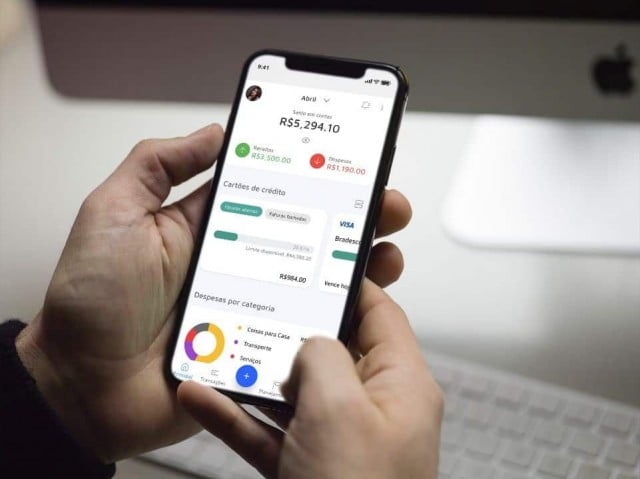
The bank's own app usually provides expense categorization, statements by category, and credit card limits all in one place—without requiring you to share your data with anyone else. For those with a primary account, this is often sufficient.
The three gateways through which the app receives its releases.
Before entrusting your financial life to a software program, it's worth understanding where the data comes from. There are three paths, each with significantly different levels of risk.
Manual typing. The user logs every expense. It takes work and discipline, but the app doesn't have access to any bank account. It's the option with the lowest risk level, and the one most people abandon in the second week.
Reading the notifications. The app requests permission to read notifications that appear in the status bar and captures the values of messages from the bank. It works without any password, but requires a powerful permission: whoever reads notifications reads all of them, including personal messages and verification codes that appear on the screen.
Connection via Open Finance. The bank sends the data directly to the institution that operates the application, with formal authorization from the client. It is the most structured and only regulated method.
There is a fourth, older model, discussed later, and it should not be in use.
What is Open Finance and why does consent win?
Open Finance is the framework created and regulated by the Central Bank to allow financial data to circulate between authorized institutions, with customer control.
Three characteristics are important in practice. Sharing only happens with the explicit authorization of the data owner. This authorization has an expiration date and needs to be renewed. And it can be revoked at any time, without justification.
The point that almost no one knows is where to revoke the data. The control is located within the bank's own application, in an area dedicated to Open Finance, with a list of all active data sharing, who receives the data, and what it covers. There's no need to request anything from the company that received the data: simply disable it at the source.
It's also important to know what authorization includes. Sharing data is different from authorizing transactions. Reading your statement doesn't give anyone the power to move money in your account, and one thing doesn't come bundled with the other.
It's worth checking the list of shares every few months. The tried-and-tested app continues to receive your data as long as your consent remains in effect.
Bank passwords should not be given to third parties.
The old model worked like this: the app would ask for the branch, account number, and internet banking password, then access the bank's website pretending to be the customer and copy the transactions from the screen.
This is dangerous for three objective reasons. The password is stored outside the bank, on a server you don't control. Whoever has the password has access to everything, not just the statement. And most banks' contracts prohibit sharing the password, which can complicate any discussion about liability in case of losses.
Any app that still asks for your bank password should be discarded. With Open Finance available, there is no technical justification for this request.
Before connecting accounts, confirm that the company is authorized to operate. The Central Bank maintains a list of authorized institutions on its official website, including the company name and registration number. A reputable company will provide its legal name and CNPJ (Brazilian tax ID) in its privacy policy or terms of use, allowing for verification in two minutes.
What does the LGPD guarantee you in this context?
Financial data is personal data, and the General Data Protection Law applies to it. Some rights are especially useful here:
- Knowing what data the company has about you and what it uses it for.
- Knowing which companies have shared your data exposes credit analysis and advertising partners.
- Correcting incorrect or outdated information.
- Request the deletion of your data when the processing is based on your consent.
- Receive the data in a format that allows it to be used with another service.
Requests go to the company's data protection officer, whose contact information should be in the privacy policy. Before installing, it's worth reading two sections of this policy: whether the data is used for advertising and whether it is shared with third parties for profile analysis.
Warning signs when installing
Financial apps are a prime target for copying because those who install them are already vigilant about sensitive data.
In the app store, check the developer's name, not just the app's name. Clones use almost identical titles, with a single letter or an extra word changed. The publication date also reveals a lot: a well-known app wasn't published last month.
Another clear sign is SMS access permission. A spending control system doesn't need to read your text messages, and that's exactly where bank and email account verification codes are sent. Requesting SMS access in a financial app is reason enough to abandon it.
Also be wary of offers of guaranteed returns, invitations to closed investment groups, and anything that asks for transfers to a personal account. Financial organization apps track expenses; they don't multiply money.
Stolen phone, phone swap, and abandoned account.
The screen lock is the first barrier, but it's not enough for an app that shows balance, statement, and limit. Activate the app's own lock, with a password or biometric authentication required each time it's opened. This feature is what prevents losses when the device is stolen while unlocked, a common situation in street thefts.
Also enable two-step verification on the account that stores the backup, whether it's a Google or Apple account. A lot of financial information ends up in backups and email attachments, and whoever controls that account gets close to everything.
When switching phones or stopping using the service, do it in the correct order. First, revoke your consent to share data in the bank's app. Then, request account closure and data deletion within the app itself or via email to the account manager. Only then uninstall the app.
Uninstalling doesn't delete anything from the server. The app is removed from the device, the registration remains active, and data sharing continues until the end of the term or until you turn it off.