Do you want to watch? Watch movies and series online on your mobile phone without buffering. And without paying a subscription? There's a legal way to do it — and it doesn't involve pirated apps or "tricks" to unlock Netflix, Prime Video, or Paramount+ for free.
What exists, and works very well, are streaming services. Free with ads. They make money from advertising, just like broadcast TV, and that's why they release the catalog for free. In this article, we list five real options, available in official stores, and explain what each one actually delivers.
First of all, an honest warning: Netflix, Prime Video, Disney+, HBO Max, and Paramount+ are paid services. A trial period doesn't mean free content—it's a trial, and then you have to pay. Any website or app that promises these catalogs for free is retransmitting content without authorization.

5 apps to watch movies online for free on your phone
1. Pluto TV
Pluto TV is the most complete example of free streaming in Brazil. It works in two modes: live channels, similar to channel surfing, and an on-demand catalog with movies and series for you to choose from whenever you want.
There's no paid plan, no trial period, and no credit card required. You pay attentively: short ad blocks play during viewing, shorter than regular TV commercials. The catalog changes every month, featuring action movies, comedies, documentaries, animations, and themed channels.
It's available for Android and iPhone, and also runs in web browsers and on most smart TVs. View on Google Play.
2. Plex
Many people only know Plex as a personal file organizer, but the app has its own free section, with movies and live channels supported by ads. You don't need to subscribe to use this part.
The advantage is organization: you can create a "watch later" list, pick up where you left off between your phone and TV, and filter by genre. Plex also offers an optional paid plan (Plex Pass) with extra features, but the free catalog doesn't depend on it.
Available for Android and iPhone. View on Google Play.
3. YouTube
YouTube comes pre-installed on most Android phones, and almost no one remembers that it has a section for... full movies for free, released by the studios themselves and supported by advertising.
To find them, open the app, go to "Movies" and look for the free movie section. In addition, official distributor channels publish national feature films, public domain classics, and full-length documentaries. It's also possible to rent or buy titles, but this is optional and always shows the price on the screen.
Because the app is lightweight and the streaming adjusts to your connection, it's one of the options that lags the least, even on poor internet connections.
4. Globoplay (free portion)
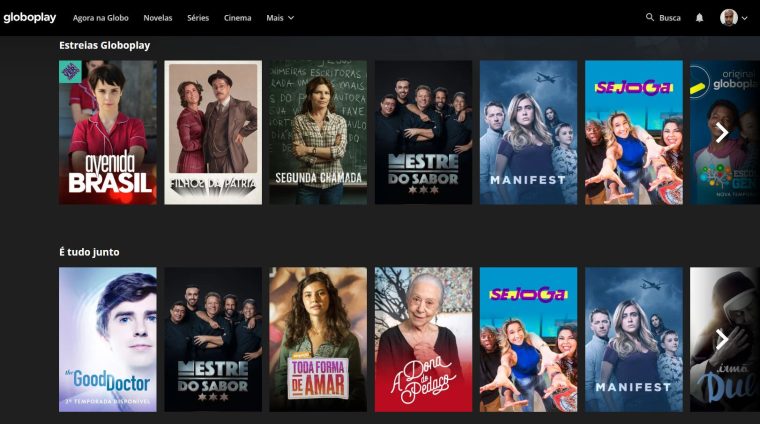
Globoplay is known for its paid plans, but it maintains a free, ad-supported section: free clips and episodes of soap operas, series, programs, and a portion of its catalog. It's a small amount compared to the complete catalog, but it's legitimate content and free of charge.
It's important to clarify the limitations: exclusive movies, live channels, and sports are only available on paid plans. If the app asks for a credit card, you've left the free plan. Available for Android and iPhone.
5. Filmzie
Filmzie is an on-demand movie catalog supported entirely by advertising. It has no paid plan, no trial period, and doesn't require a credit card: you open it, choose a movie, and watch, with ad blocks interspersed throughout the session.
The collection consists of independent productions, European films, documentaries, and catalog titles—don't expect theatrical releases, because that's not available for free anywhere. However, it's a good resource for those who have exhausted the more well-known options. Available for Android and iPhone. View on Google Play.
Two that appear as "free" but are not: Looke and Crunchyroll.
Looke appears on many lists as if it were free, but it is not. The download is free, but the service works through... Monthly subscription or one-off rental of titles.. It's a legitimate platform with a good selection of national content — it just doesn't count for those who want to watch without paying.
The case of Crunchyroll It's more recent and catches many people by surprise. For years the service maintained a free layer with ads, and that's how it still appears in most articles and videos about anime. But... This layer was terminated on December 31, 2025..
Since January 1, 2026, the entire catalog requires a subscription — including older episodes, which were previously available for free. Only the paid plans remain (Fan and Mega Fan), both with a seven-day trial that requires a payment method and renews automatically. In other words: if your goal is to watch without paying anything, Crunchyroll is no longer an option, no matter what older lists insist otherwise.
How to prevent video freezing
Crashing is almost never the app's fault. A few tweaks resolve most cases:
- Reduce the video quality to 480p when using 4G. The difference on the phone screen is minimal, and data consumption drops significantly.
- Close any apps running in the background before starting the movie.
- For Wi-Fi, stay close to the router and, if your device has it, prefer the 5 GHz band.
- Clear the app's cache from time to time in your phone's settings.
- If the service allows downloads for offline viewing, download it over Wi-Fi and watch it later.
Why avoid "free movie" apps outside of app stores?
Apps distributed as APKs that promise movie releases and complete paid catalogs retransmit content without authorization. Besides the legal problem, they are a known gateway for malware and the theft of banking data because they request permissions that a video player doesn't need.
Stick with what's on Google Play and the App Store. The free catalog with ads is already large enough to keep you entertained for many nights, and you're not taking any risks.