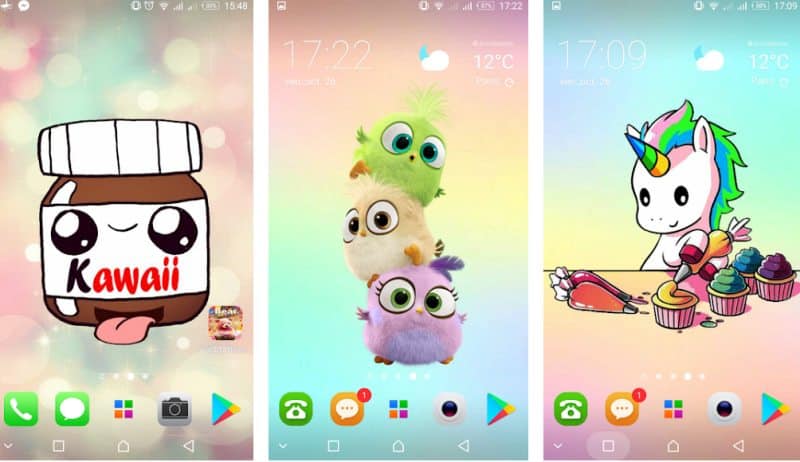
The smartphone home screen is one of the things we look at the most throughout the day. Having a background or “wallpaper” that is pleasing to the eye and that reflects our taste and personality can make the experience of using the device more pleasant and unique.
Fortunately, there is a wide range of apps that allow you to download mobile wallpapers, both free and paid. This article presents a list of the best apps to download wallpapers, their features and how they can help personalize your device.
Zedge
Zedge is one of the most popular and oldest wallpaper apps available. In addition to offering a wide variety of smartphone backgrounds, Zedge also has ringtones, alarms, and notification sounds.
The application also has an intelligent search system that allows you to easily find the ideal wallpaper according to your preferences. You can search by categories like films, games, nature and much more.
Zedge is free but has ads and in-app purchases for a premium ad-free experience.
The application Zedge is available for android It is iphone.
walli
Walli is a wallpaper app that stands out for featuring a collection of backgrounds created by independent artists from around the world. The platform offers a variety of artistic styles and themes to suit all tastes.
In addition, the app also has a reward system that allows users to support artists. financially, ensuring that they receive a share of the profits generated by views and downloads of their works.
Like Zedge, Walli is also free, with the option of a premium subscription that removes ads and gives you access to exclusive content.
Walli can be downloaded either from android how much in iphone.
Backdrops
Backdrops is another among the excellent wallpaper downloader apps that focuses on providing high quality and original backgrounds created by a team of professional designers.
The platform has a super intuitive and easy-to-use interface, allowing users to quickly navigate through the various categories and collections available.
In addition, Backdrops also offers a selection of free and premium wallpapers, with the purchase option unlocking access to an even larger pool of exclusive designs.
The Backdrops app is also available for android It is iphone.
Wallpapers by Google
Developed by Google itself, the Wallpapers app is a reliable option for those seeking high-quality, ad-free backgrounds. The app includes a collection of images selected by Google, as well as allowing access to other sources, such as Google Earth collections and your own photos saved on your device.
An interesting feature of Wallpapers is the option to activate the automatic background change on a daily basis, keeping your home screen always fresh and interesting. The app is free and has no ads.
The app is only available for android.
carpet
Tapet is unique in the list of wallpaper download apps as it does not offer a collection of pre-existing images. Instead, it automatically generates custom backgrounds based on your color and style preferences.
Using an artificial intelligence algorithm, Tapet creates high-quality, high-resolution wallpapers that adapt perfectly to your device's screen.
The app also lets you set how often you want the backgrounds to change, whether it's daily, weekly, or manually. Carpet is free to use, with in-app purchases to unlock additional features.
Tapet, from Sharpregion, is exclusive to android There is no iPhone version. If you find something with a similar name on the App Store, it's from a different developer and is not related to the app described here.
resplash
Resplash is a wallpaper application that uses the Unsplash platform as an image source. Unsplash is known for its vast collection of high-quality photos taken by professional and amateur photographers around the world.
Resplash allows users to browse categories, collections and recommendations based on their preferences.
In addition, the application offers the option to download several images at once and set the frequency of automatic background change.
Like the other apps mentioned above, Resplash is free to use and has in-app purchases to remove ads and access premium features.
Resplash is only available for android. Those who use iPhones and want photos from Unsplash can use the official Unsplash app, as this client doesn't have an iOS version.
Conclusion
Personalizing your smartphone with a background that reflects your style and personality can significantly enhance your device usage experience.
There are many apps to download wallpapers for mobile, each with its own characteristics and advantages.
Whatever type of background you're looking for, you're sure to find the ideal app for your needs.
Did you like the article? Be sure to check out other content on our blog!
How to choose between the options
- Space required. Check the size and available space beforehand. Installations interrupted due to lack of space often leave residue.
- Last updated. An application that has been dormant for more than a year is likely to break in the next system version.
- Recent reviews. Read the newest release notes, not the old ones: that's where problems that arose in the latest versions appear.
- File origin. Always install from the official store. APK files from random websites are the main vector for malware on Android.
What these apps don't do
This is the part that almost no list mentions, and it's precisely what separates expectation from result.
- There is no legitimate free version of a paid app. What circulates as a 'mod' or 'unlocked premium' usually comes with malware.
- Disabling Play Protect to install something is precisely the step that opens the device up to banking trojans.
- An app removed from the official store was usually taken down for violating policy—reinstalling it from elsewhere will recreate the problem.
- Downloading does not guarantee compatibility: features that rely on missing hardware will not work, even if the app is installed.
Frequently Asked Questions
Is it safe to install APKs from outside the app store?
It's not recommended. The store verifies applications; a standalone file doesn't go through this check.
The app isn't showing up in the store search results. What now?
It may be unavailability in your region or incompatibility with the device. It's worth looking for an official alternative.
How do I free up space for installation?
Uninstall what you don't use, clear the cache of larger apps, and move photos to the cloud.
Does installing too many apps slow down your phone?
What really weighs the load is what's running in the background. Check the usage per app in the settings.
Can it be installed on a memory card?
Some devices allow you to move parts of the app, but performance usually drops.
How to use it in practice
- Always download from the official store. It's the only method with automatic verification. Individual files don't go through this check.
- Confirm there is enough space beforehand. Installations interrupted due to lack of space often leave behind residue that needs to be cleaned by hand.
- Review the permissions during installation. Compare this to what the app actually does. Accessibility or administrator requests deserve extra attention.
- Read the recent reviews. Sort by newest: that's where the problems with the latest versions appear.
What goes wrong most often?
- Grant all permissions at once without reading.
- Reinstalling an app that has been removed from the store—it's usually because it was removed for violating policy.
- Looking for a "mod" or "unlocked premium" version of a paid app? It often comes with malware.
- Disabling Play Protect at the request of a website — that's precisely the step that unlocks the device.
What the cell phone itself already does.
The Play Store itself has built-in security verification: Play Protect analyzes what's already installed and can be manually activated at any time through the store's menu. On the iPhone, the App Store is the only option provided, which significantly reduces this type of risk.