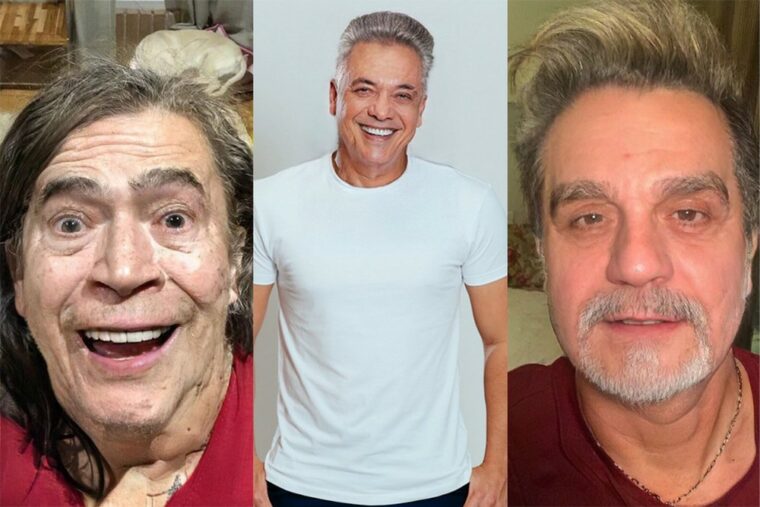
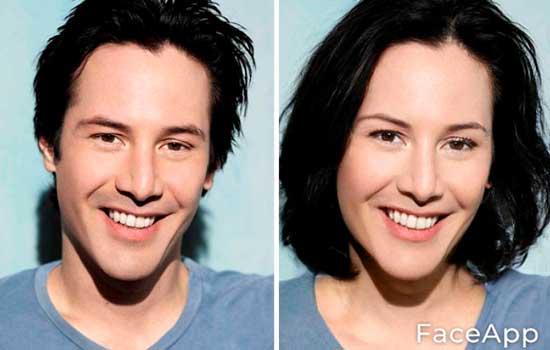
O FaceApp It's a photo editor created in 2017 that has gone viral again in Brazil because of its filters. Among them is one that "swaps the gender" of the person in the photo. It's important to clarify this from the start: The result is a simulation created by artificial intelligence, pure entertainment.. The app redraws facial features following generic aesthetic standards — it doesn't show what you would really look like, it has no scientific basis, and it says nothing about anyone's gender identity.
That said, the app has good editing tools. Besides the gender filter, you can age or rejuvenate the photo, change hair color, add or remove a beard, and apply makeup. Many of the features are marked with the seal. “"Pro"” It only works on the paid subscription version.
See below for step-by-step instructions on how to use the filter and share the result on Instagram, Facebook, TikTok, or wherever you want.
Application details
FaceApp: Facial Editor Photo editor with AI filters.
What he does: It applies a filter that redraws the face in the photo with features associated with the other gender. It's a montage, not a real projection.
Price: Free to download, with an optional subscription for "Pro" features.
Where to download: android It is iphone.
How to use this feature on FaceApp
Step 1. Download the app from the Play Store or the App Store, open it, and authorize access to your photo gallery.
step 2. You can take a photo right away by tapping Camera, or import one from your gallery by tapping Photo. The app has a filter that only shows selfies.
step 3. With the photo selected, open the Editor tab and tap the Type option.
step 4. Select the female or male filter. The app processes the image in a few seconds.
step 5. Did you like the result? Tap Apply.
step 6. If you like, combine it with other filters: makeup, background change, contrast and saturation adjustment, among others.
step 7. To create a side-by-side image with the original photo, tap "before and after".
Step 8. When finished, tap “Save” in the upper right corner to save the image to your phone's gallery. The option to share directly to social media will also appear on the same screen.
Before installing, read the terms.
According to Fabio Assolini, senior security analyst at Kaspersky, FaceApp itself is not a malicious application. The point of concern is the terms of use, which are considered vague regarding what the company can do with the uploaded images. Since the photos are processed on the developer's servers, it's worth reading the privacy policy before granting access to your gallery and avoiding sending photos of third parties without authorization.
Is it worth testing the filter?
So, do you like this type of filter? Tell us what you think in the comments. Just remember: the image you get from FaceApp is a joke generated by AI. To learn more about the app, visit the official website. FaceApp Or download directly from the stores.
Criteria that make a difference in the choice
- It works without internet. Editors who process photos on their own device work offline. Those that rely on a server do not—and send your photo externally.
- Resolution of the exported file. Some reduce the image size when exporting without a signature. If the photo is for printing, this is a crucial factor.
- Watermark on the free version. This is the most common trick: the app lets you edit for free, but then stamps the logo on it when you save. Check this before investing your time.
- App weight. Full-featured editors can exceed 300 MB. On devices with limited storage, a lightweight app will handle the basics without crashing.
What these apps don't do
It's important to know what's beyond the reach of this category—that's what avoids frustration and, most importantly, prevents falling for those who promise the impossible.
- They don't recover details that don't exist in the file. Increasing the resolution reconstructs pixels by estimation—it doesn't reveal lost information.
- Beauty filters alter the image; they don't alter the person. It's important to remember this when comparing the result to an unedited photo.
- No app can see through clothes or walls. What exists is simulation — a generated image, not a captured image.
- They don't remove watermarks from third-party photos. Besides not working properly, using the image without a license is a copyright violation.
Frequently Asked Questions
Can I edit without a watermark for free?
Yes, in several applications, but with limited features. Check beforehand by saving a test image.
Is a free editor safe?
Check the permissions requested. A photo editor does not need access to contacts, messages, or microphone.
Does the photo lose quality when edited?
Each export recompresses the file. Edit once and save, instead of saving after each adjustment.
Which format should I save it in?
JPEG for general use, PNG when there is transparency or text, and the original format when archiving.
Will my photos go to the cloud?
It depends on the app. Those that do everything on the device work offline; those that use a server send the image externally.
What to do, in order.
- Adjust the light before applying the filter. Exposure, contrast, and shadows first; filter later. In reverse order, the filter amplifies the flaw.
- Export at the highest quality available. If you're going to print, look for the high-resolution export option — some free versions reduce the resolution without warning.
- Work on a copy. Duplicate the image before editing. Good apps do this automatically, but double-checking prevents losing the original.
- Crop with the purpose of taking into account where the photo will end up. Square and vertical 4:5 for social media, 16:9 for screen. Crop after exporting and recompress again.
Where most people slip
- Granting access to all photos when the app only needs one.
- Discovering the watermark only when exporting, after half an hour of editing.
- Increasing the resolution in the hope of revealing detail — the program estimates pixels, it doesn't retrieve information.
- Saving after each adjustment and watching the image lose sharpness without understanding why.
Before installing: what's already on the device
The phone's built-in gallery editor already handles cropping, light adjustment, object removal, and perspective correction in recent versions of Android and iPhone. For quick adjustments, it solves the problem without installing anything or sending the image externally.
What happens underneath when the face changes gender?
Filters of this type use generative networks. During training, the system receives a huge volume of facial photos labeled as male or female and learns which characteristics tend to separate the two groups in the images it has seen.
One part of the network generates the new image. Another part evaluates whether that result would pass for a real photo of the target group. The two compete until the generator produces faces that the evaluator accepts. Once the training is finished, one model remains capable of taking a face and returning it with the characteristics of the other group.
When used, the app locates points on your face, aligns the image in a standard position, applies the learned transformation, and returns the cutout to its place. Hair, eyebrows, jawline, skin texture, and beard are the areas where the change is concentrated, because these were the most affected during the training.
Why does the result always fall into the same stereotype?
The model learns the average of the dataset it was given. It doesn't know what gender, culture, or personal style is. It reproduces the strongest statistical correlation it found in the labeled photos.
Hence the predictable pattern of the result.
- On the "feminine" side: long hair, thin and arched eyebrows, smoothed skin, visible makeup, narrow jawline.
- On the "masculine" side: a wider jawline, thicker and straighter eyebrows, a hint of beard, skin with a more defined texture, short hair.
This is data bias. The photos used in the training came from databases where women predominantly appear with long hair and makeup, and men with beards and short hair. The filter reflects this selection, not the reality of the people.
Therefore, the result tends to erase features that deviate from the norm. Those with shaved heads, long beards, those who don't wear makeup, or those with an androgynous style usually receive a version that is much less like themselves, because the model pushes everything towards the average it has learned.
It's worth noting that there's no setting in the app that corrects this. The stereotype is in the training set, not in a setting you can change.
Filters are a joke, gender transition is something else entirely.
The effect produces a software-altered image in a few seconds. Nothing more than that.
Gender transition is a personal, lengthy process that involves identity, family and social context, and support from healthcare professionals. There's no button, no preview, and it's not just about appearance.
Treating the filter result as if it were a transition simulation is inaccurate and disrespectful to those who go through this process. Using the image to mock someone is even worse, and may constitute an offense against the honor of the person exposed.
Using the result to deceive someone has consequences.
Posting an altered photo on your social media profile, dating app, or any service that relies on identification is deceptive, even when the intention is only to attract attention. Those interacting on the other side believe they are seeing a real person.
When deception is used to gain an advantage over someone, the situation changes. Inducing another person into error with a false identity to obtain money, a gift, or any benefit can constitute fraud, as stipulated in article 171 of the Penal Code. The filter is only the tool; the responsibility lies with the user.
Publishing an altered image of another person without authorization is another problem. The image belongs to the person depicted, and turning the face of an acquaintance into a joke for the group can lead to serious embarrassment, even if the intention was mild.
It's worth remembering a practical detail: those who know the person recognize the face even when altered. The filter changes hair, eyebrows, and texture, but maintains the proportion between the eyes, the shape of the nose, and the distance between the features. It is precisely this set of features that the human brain uses to recognize someone.
Watermarking, exporting, and what changes in the paid version.
In this type of app, the business model is almost always the same. The free version unlocks the effect and delivers the image with a watermark or in reduced resolution. Saving it clean, in a larger size, and without ads in between usually depends on a subscription.
Before signing up for anything, test the effect with the photo you actually intend to use. If the free result isn't convincing, the paid version delivers the same image without the watermark, not a better one.
Recent front-facing photo is correct, old digitized photo is wrong.
The model was trained using modern digital photographs, taken from the front, with good lighting and calibrated colors. The more your image resembles this standard, the better the result.
An old, digitized photograph disappears with all these conditions at the same time. The paper has yellowed, the contrast is flattened, the film grain has turned into noise during digitization, and often the pose is in profile or three-quarter view. The face detector has less reference to work with, and the transformation comes full of artifacts.
Painted portraits, drawings, statues, and game characters tend to fail for the same reason: the texture doesn't match anything the model saw during practice. The filter might return some image, but the result is usually a distortion, not a convincing version of the face.