Since the amount of products and steps needed for good makeup is much greater than what the final result shows, we've selected some apps that will help you when it comes to makeup and give you the best makeup tips and the latest makeup tips . personal care. , all without going to a beauty salon. Check out the app.
What are the best apps to do makeup on your cell phone?
YouCam Makeup
The YouCam Makeup app lets you apply makeup virtually, test makeup in real-time and in 3D. Its tools give users options to smooth skin, change eye color, lipstick texture and color, dye and cut hair, and shape eyebrows.
In this app you can share ideas, ready-made looks and trends through the available social network called Beauty Circle. With augmented reality makeup camera you can share or view makeup tutorials.
Another very useful feature of the app is the skin diary, which provides information such as points of attention on the face and care tips.
It is available for Android and iOS and can be downloaded from play store or App Store.
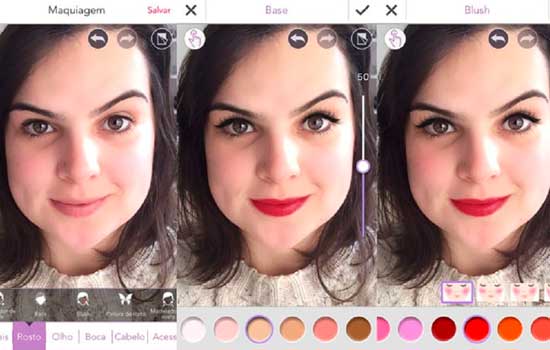
Perfect365
O Perfect365 it is a application photo editing and makeup virtual that provides several pre-defined makeup models created based on trends and styles of beauty used by celebrities and which can be personalized.
Its technology guarantees a more precise version, capable of adjusting the positions of the keys. In turn, the app brings different shades of lipsticks, eye shadows, eyeliners, eyelashes, facial contours and much more.
It also contains about 20 tools to remove blemishes, remove dark circles, smooth skin, whiten teeth, make phone peace, and much more.
O application is available for android It is iOS, so to download it, go to play store or app store.
MakeupPlus
MakeupPlus is a very complete app that lets you test foundation, eyelashes, lipstick, change the position of the hair, and much more, in addition to providing ready-to-use makeup styles to apply to photos.
It also provides users with beauty guides with makeup tutorial videos created exclusively by bloggers and makeup artists.
The steps included in the tutorial can be tested in the application itself, for example using its preparation and outline tools.
A good idea is to take selfies through the app, as it provides facial recognition for several faces in a photo, that is, it is possible to apply makeup to everyone in the photo, and even add a combination of accessories at the same time. .
MakeupPlus is also available for Android and Iphone, to download just access the Play Store or App Store.
There are other apps developed for the same purpose and basically using the same tools, such as Facetune, Cymera and InstaBeauty.
services
Share with us, what's your favorite app?
How to choose between the options
- Content aligned with your objective. An app for conversation is different from an app for exams. Choosing one based on your goal will prevent you from giving up in the second week.
- What is free. Many offer the first few lessons for free and charge for continuing. It's worth seeing how far the free portion goes.
- It works offline. Studying while commuting requires downloading lessons beforehand, and not all apps allow this.
- The certificate has an expiration date. Application certificates are rarely formally recognized. If the goal is a resume, confirm this beforehand.
What these apps don't do
This is the part that almost no list mentions, and it's precisely what separates expectation from result.
- Gamification helps with consistency, but obscuring the content with points and sequences can give the feeling of greater progress than there actually is.
- Fluency is not guaranteed on its own: conversational practice with another person remains necessary.
- They are not a substitute for formal courses when a recognized certification is required.
- Free content often covers the basics and stops right where the difficulty begins.
Frequently Asked Questions
How much time per day?
15 to 20 minutes a day usually yields more results than two hours once a week, because spaced repetition is what makes it stick.
Is it possible to learn solely through the app?
You can go a long way in terms of vocabulary and comprehension. But to speak naturally, practice with another person remains irreplaceable.
Is it suitable for children?
Many have a kids' mode. It's worth checking the rating and whether there's advertising within the app.
Is the premium version worth paying for?
It makes sense when you've already established the habit and the free content has run out. Paying before establishing the routine usually results in a forgotten subscription.
Does it work offline?
Some allow you to download lessons. Check that, because that's what determines whether it's possible to study on public transport.
How to use it in practice
- Export at the highest quality available. If you're going to print, look for the high-resolution export option — some free versions reduce the resolution without warning.
- Crop with the purpose of taking into account where the photo will end up. Square and vertical 4:5 for social media, 16:9 for screen. Crop after exporting and recompress again.
- Adjust the light before applying the filter. Exposure, contrast, and shadows first; filter later. In reverse order, the filter amplifies the flaw.
- Work on a copy. Duplicate the image before editing. Good apps do this automatically, but double-checking prevents losing the original.
What goes wrong most often?
- Discovering the watermark only when exporting, after half an hour of editing.
- Saving after each adjustment and watching the image lose sharpness without understanding why.
- Granting access to all photos when the app only needs one.
- Increasing the resolution in the hope of revealing detail — the program estimates pixels, it doesn't retrieve information.
The alternative that is already included in the system
The phone's built-in gallery editor already handles cropping, light adjustment, object removal, and perspective correction in recent versions of Android and iPhone. For quick adjustments, it solves the problem without installing anything or sending the image externally.
Why the lipstick on the screen isn't the lipstick in the mirror.
The makeup simulator does just one thing: it identifies the lip, eyelid, or cheek area in your photo and paints a color over it. The color reaches your eye without ever having touched your skin.
Real skin isn't a smooth, neutral surface. It has undertones, texture, pores, oiliness, and its own redness that changes throughout the day. Each of these layers interferes with the pigment deposited on top of it.
That's why the same nude lipstick looks elegant on one person and washes out the lips on another. It's not a product defect or an app error. It's the skin's undertone changing how the color is perceived.
A foundation that looked perfect in the simulation might turn grayish on oily skin after two hours because sebum alters the pigment. None of that is factored into the simulator's calculations.
Subtone: the reference that changes the outcome.
Undertone is the underlying color that appears beneath the surface of the skin. It doesn't change with tanning. Three simple observations at home can help you get an idea of yours, and serve as a practical guide, not as a hard and fast rule.
- Wrist vein under natural light: veins that appear greenish usually indicate a warm undertone; bluish or purplish, a cool undertone; a mixed reading suggests neutral.
- Jewelry: hold a gold and a silver piece of jewelry close to your face, under the same light. The one that makes your skin look more vibrant usually matches your undertone.
- Sun: skin that tans easily tends to be warm; skin that reddens before tanning tends to be cool.
The three tests may disagree with each other, and this happens frequently. When they disagree, the product on the skin decides more than any conclusion drawn at the test table.
The lighting in the place where you do your makeup.
Light temperature changes color. The yellow light in the bathroom pushes everything towards warm and makes dark skin appear more orange. White LED light pulls towards cool and makes the skin look paler than it is. Daylight, near a window and without direct sunlight, is the closest reference to what other people perceive.
Makeup applied under yellow light often appears heavy in public.
A foundation test has a specific place: the jawline, extending slightly down to the neck, under natural light. The back of the hand has a different color than the face, almost always darker and more yellowish, and it can be deceiving. Apply three strips of similar shades and choose the one that disappears.
The front camera blocks out exactly what you need to see.
Many devices apply automatic smoothing to the front camera. The software smooths texture, reduces pores, and evens out skin tone before the photo is saved. The result is pleasing but not suitable for study.
The mistake lies in the texture: the harsh, blended eyeshadow, the visible foundation line on the jawline, the creased concealer under the eyes. The smoothing process erases exactly those clues.
In your camera settings, look for options labeled "beautification," "retouching," "beauty," or "smooth skin," and turn them off. On some devices, the control is located within portrait mode.
For practice, the most reliable setup is a mirror and natural light, with the rear camera used only for recording. The rear camera usually has a better sensor and less cosmetic processing.
Brush, sponge and expiration date
Brushes and sponges accumulate sebum, product residue, and skin cells. It's a humid and enclosed environment, favorable to bacteria and fungi. The sponge is the item that gets the dirtiest because it's used wet and takes a long time to dry.
- Wash the makeup sponge with mild soap after each use, or at least once a week.
- Wash your powder and eye makeup brushes once a week with warm water and mild soap.
- Dry it lying down, resting on the edge of the sink, with the bristles facing outwards. Drying it standing upright with the bristles facing upwards causes water to run into the handle, loosening the glue and ruining the brush.
- Discard the sponge when it hardens, tears, or becomes permanently stained.
Almost every cosmetic product has a drawing of an open jar with a number next to it: 6M, 12M, 24M. This indicates the expiration date after opening, counted in months, and begins on the day of opening, not the manufacturing date. Mascara usually has the shortest expiration date and is the most sensitive, because the brush is returned to the tube dirty with each use. Expired mascara burns and irritates the eyes.
Before trying a new product, apply a small amount to your forearm and wait a day. If itching, burning, or redness occurs, discontinue use and consult a dermatologist. Skin reactions require medical attention.
A study routine that shows progress.
Learning makeup is about repetition with practice. The app is for choosing what to test; the rest happens at the makeup station.
- Choose a single feature each week: just eyeliner, just smoky eye, just foundation.
- Always practice in the same place, with the same light, and at the same time. Changing the light from one day to the next prevents comparison.
- Take a photo before and another after, at the same distance and angle, with beautification turned off.
- Compare today's photo with one from a month ago, not with the image generated by the simulator.
Two weeks of recording reveal more than any screen preview. And they reveal what the mirror hides in the moment: asymmetrical lines, a light source at the wrong height, a poorly resolved transition.